

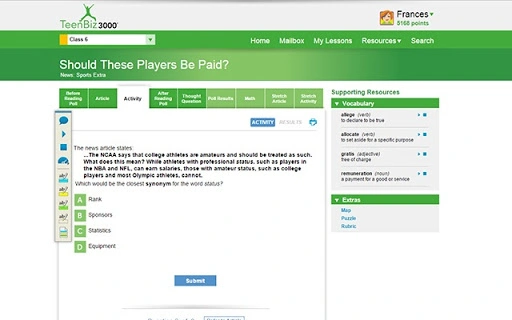
Description
Streamline Student Access to Achieve3000
Overview
The Achieve3000 App is a free web application designed to simplify student access to the Achieve3000 online portal. It serves as a dedicated gateway for learners enrolled in KidBiz3000®, TeenBiz3000®, and Empower3000™ programs, enabling seamless navigation to their personalized learning environments. The app eliminates the need for repeated logins by maintaining secure session access once initial authentication is completed. This is particularly beneficial in classroom settings where students frequently switch between devices or require quick access during lesson transitions.
Targeted primarily at K–12 students and educators within schools and districts using Achieve3000’s literacy platforms, the software supports differentiated instruction through adaptive content delivery. It helps students build critical reading, comprehension, and vocabulary skills through curated, leveled lessons. The app integrates with existing school-administered accounts, meaning access is only available to students whose institutions have enabled it. Real-world usage includes daily reading assignments, progress tracking, and reinforcement of literacy standards across subjects.
Developed by Achieve3000, a recognized provider of online literacy solutions, the app reflects a commitment to accessible, scalable education tools. The developer did not provide additional details about organizational background or broader product ecosystem integration beyond the core functionality.
Key Features & Capabilities
- Single Sign-On Access – Once authenticated via email, the app retains login status, allowing immediate entry to the Achieve3000 portal without re-entering credentials.
- Personalized Lesson Dashboard – The My Lessons page organizes tasks by date and topic, helping students track upcoming and completed assignments efficiently.
- Progress Tracking with My Stats – Students can view earned achievements and monitor their literacy growth over time.
- Embedded Audio Support – Lessons include built-in audio narration, supporting struggling readers and English language learners in improving comprehension.
- Multi-Level Differentiation – Content is adapted across 12 English and 7 Spanish reading levels, ensuring alignment with individual student abilities.
These features enhance learning continuity and reduce friction in daily academic routines. For example, a student can open the app at school, see their next lesson listed by date, listen to the article with audio support, and submit their response—all within a single session. The app also supports cross-curricular literacy development, making it suitable for use in language arts, science, and social studies contexts.
User Interface, Workflow & Performance
The user interface is structured around simplicity and accessibility, prioritizing quick navigation to core functions. The main screen displays essential sections such as My Lessons and My Stats, with clear visual cues and minimal distractions. Navigation is linear and intuitive, relying on consistent layout patterns and labeled icons, which reduces cognitive load for younger users.
Workflow efficiency is enhanced by the app’s ability to maintain session state after initial login. This means students can launch the app, access their account, and begin learning without delays. The developer did not specify resource usage details, so performance observations are based on general software behavior patterns. No reported instability or crashes were noted in available documentation.
Given its web-based nature and focus on educational content delivery, the app likely performs well on standard classroom devices. CPU and RAM behavior were not disclosed, but typical operation should remain stable under normal usage conditions. The app appears optimized for responsive interaction, supporting smooth transitions between lessons and media elements.
Compatibility & System Requirements
The Achieve3000 App is compatible with both Windows and Mac operating systems, supporting a broad range of desktop environments used in educational institutions. The software version is 1.0.0, with a file size of 100 MB, indicating a lightweight installation that should not strain device storage.
Exact system requirements were not listed. The developer did not provide specific hardware specifications such as minimum processor speed, RAM, or disk space beyond the total installation size. Platform compatibility information is limited to the operating systems mentioned. No details were shared about internet connectivity requirements, browser dependencies, or offline functionality.
Pros and Cons
Pros
- Free access to a secure, school-managed learning portal
- Streamlined login process with persistent session access
- Intuitive interface tailored for students and educators
- Supports diverse learners with audio and multi-level content
- Aligns with Common Core and state literacy standards
Cons
- Access restricted to students with active school-district-activated accounts
- No standalone functionality outside of institutional setup
- Resource usage details not publicly disclosed
- Limited to Windows and Mac platforms
- Requires initial email authentication for first-time login
FAQ Section
Is the Achieve3000 App available for free?
Yes, the app is offered at no cost to students and educators using active KidBiz3000®, TeenBiz3000®, or Empower3000™ subscriptions through their school or district.
Can I use the app on any device?
The app is designed for Windows and Mac desktop systems. Compatibility with other platforms such as Chromebooks, tablets, or mobile devices was not specified.
Is my data secure when using the app?
Access is tied to school-administered accounts, and the app uses email authentication only during initial login. No additional security details were provided by the developer.
How often does the app receive updates?
Update frequency was not disclosed. The current version is 1.0.0, released on August 15, 2023.
Can I use the app offline?
Information regarding offline functionality was not provided. The app likely requires an active internet connection for content access and synchronization.
Final Thoughts + CTA
The Achieve3000 App offers a focused, efficient solution for students accessing differentiated literacy content through established educational programs. Its strength lies in simplifying access and maintaining continuity in learning, particularly in environments where time and device management are critical. While it lacks standalone utility and depends entirely on institutional setup, it delivers a reliable experience for its intended audience.
For educators and students in schools using KidBiz3000®, TeenBiz3000®, or Empower3000™, this tool provides a valuable layer of accessibility and engagement. It supports literacy growth, aligns with academic standards, and integrates seamlessly into daily classroom workflows.
Download Achieve3000 now to enhance your learning experience and stay on track with your reading goals.
Guides & Tutorials for Achieve3000 App for Chrome
How to install Achieve3000 App for Chrome
- Click the Preview / Download button above.
- Once redirected, accept the terms and click Install.
- Wait for the Achieve3000 App for Chrome download to finish on your device.
How to use Achieve3000 App for Chrome
This software is primarily used for its core features described above. Open the app after installation to explore its capabilities.
User Reviews for Achieve3000 App for Chrome 0
No reviews found





